
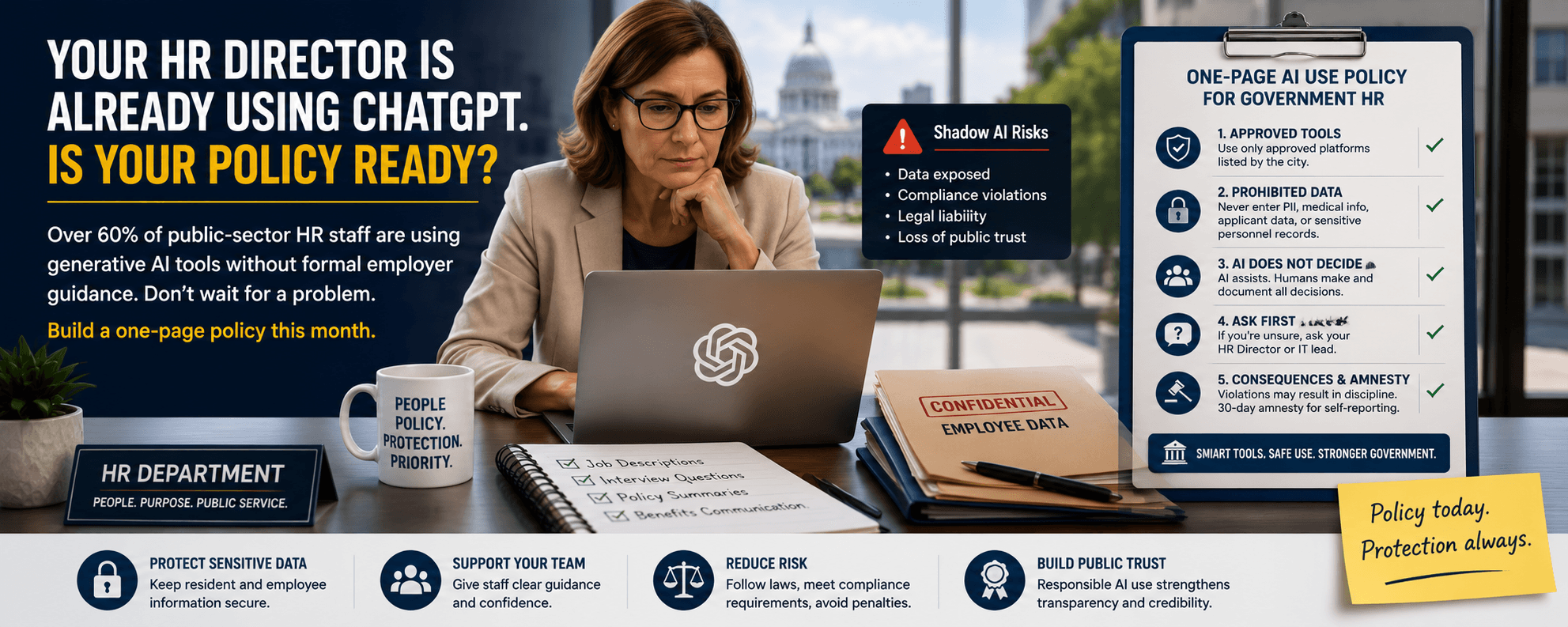
Your HR Director Is Already Using ChatGPT. Is Your Policy Ready?
Last month, an HR director in a mid-sized city told me she'd been pasting candidate resumes into ChatGPT to draft interview questions. She's brilliant, ethical, and overworked. She also had no idea she'd just exposed applicant data to a third-party system the city had never vetted.
Here's the uncomfortable truth: surveys released this week from SHRM and GovExec show that over 60% of public-sector HR staff are using generative AI tools without any formal employer guidance. That's not a future problem. That's a right-now problem sitting in your city hall.
The good news? You don't need a 40-page policy or a six-month committee process. You need one page, this month. Let me walk you through exactly what to put on it.
Why is "shadow AI" already a problem in government HR?
Quick Answer: Shadow AI is when employees use AI tools like ChatGPT, Copilot, or Gemini without IT approval or written guidance. In government HR, it's spreading fast because staff are stretched thin and AI saves real time. The risk: sensitive employee and applicant data is leaving secured systems and entering platforms your city never approved, reviewed, or signed a data agreement with.
In my experience working with government teams, shadow AI rarely starts with bad intent. It starts with a tired benefits coordinator trying to summarize a 30-page policy document, or a clerk drafting a job description at 4:45 p.m. on a Friday.
The problem isn't the tool. It's the absence of guardrails. Without policy, your team is making individual judgment calls about Social Security numbers, medical accommodations, disciplinary records, and protected hiring data — every single day.
What should a one-page government AI use policy actually cover?
Quick Answer: A workable one-page AI policy for government HR covers five things: which tools are approved, what data can never be entered, where AI cannot make decisions, who to ask when unsure, and how violations are handled. Keep it to plain English. If your front-desk clerk can't understand it on first read, rewrite it.
Here's the structure I recommend to every HR director I train:
- Approved tools list — Name the specific platforms (e.g., Microsoft Copilot with government tenant) employees may use. Everything else is off-limits until reviewed.
- Prohibited data types — Spell out what never gets typed into AI: PII (personally identifiable information like SSNs, addresses, DOBs), medical records, disciplinary files, applicant identifiers, and union-protected communications.
- Decision boundaries — AI can assist. AI cannot decide. More on this below.
- The "ask first" rule — One named person employees contact when they're unsure. Usually the HR director or IT lead.
- Consequences and amnesty — Make clear violations matter, but offer a 30-day amnesty window for staff to disclose past use without penalty.
Can AI make hiring or personnel decisions in government?
Quick Answer: No. AI should never make final hiring, promotion, discipline, or termination decisions in government employment. It can help draft job descriptions, summarize policy, or organize notes — but a human must make and document every personnel decision. This isn't just best practice. It's increasingly a legal requirement under EEOC guidance and emerging state laws.
A common question I get from HR directors is: "Can I use AI to screen resumes?" My answer is always the same — be very careful. Automated screening tools have a documented history of bias against protected groups, and the legal exposure for a public employer is significant.
What I've seen work well: using AI to help you write a clearer job posting, generate a list of interview questions tied to job criteria, or summarize your own notes after an interview. What I've seen go wrong: letting AI rank candidates, score interview transcripts, or flag "culture fit." Keep humans in the decision seat. Always.
How do I roll this policy out without scaring my team?
Quick Answer: Frame the policy as permission, not punishment. Most HR staff are already using AI and feel quietly anxious about it. A clear policy gives them safe ground to stand on. Announce it in a 20-minute team meeting, offer a short training, and pair it with the 30-day amnesty window so people can come forward about current practices.
In my experience, the rollout matters as much as the policy itself. Three things make it land:
- Lead with empathy. Acknowledge people are already using these tools and that's understandable.
- Give a real example. Walk through one approved use case and one prohibited use case from your actual workflow.
- Keep the door open. Tell staff the policy will evolve. Invite questions in writing for the next 30 days.
When I rolled out an early AI policy in Lilburn, the questions we got from staff shaped version two. That's a feature, not a bug.
What's the bottom line?
Your HR team is using AI right now, whether you've authorized it or not. A simple one-page policy this month is dramatically better than a perfect policy six months from now. Start with approved tools, prohibited data, and a clear "humans decide" rule — then iterate.
Ready to train your team?
If you'd like help drafting your one-page policy or training your HR staff on safe AI use, reach out to GovAI Education Group — we build this exact framework with government teams every month.
LaTonya Koonce
Founder, GovAI Education Group · City of Lilburn Merit Award Recipient
LaTonya has trained government teams for 20+ years and specializes in plain-language AI education for public-sector professionals. Learn more →